Go live where yourmembers already are.
Video rooms, audio rooms and webinars that open in the browser — no downloads, no third-party meeting links, no audience handed to someone else's platform. The recording becomes a replay in the same space when you're done.
How it works
From "let's do this live" to live, in about a minute
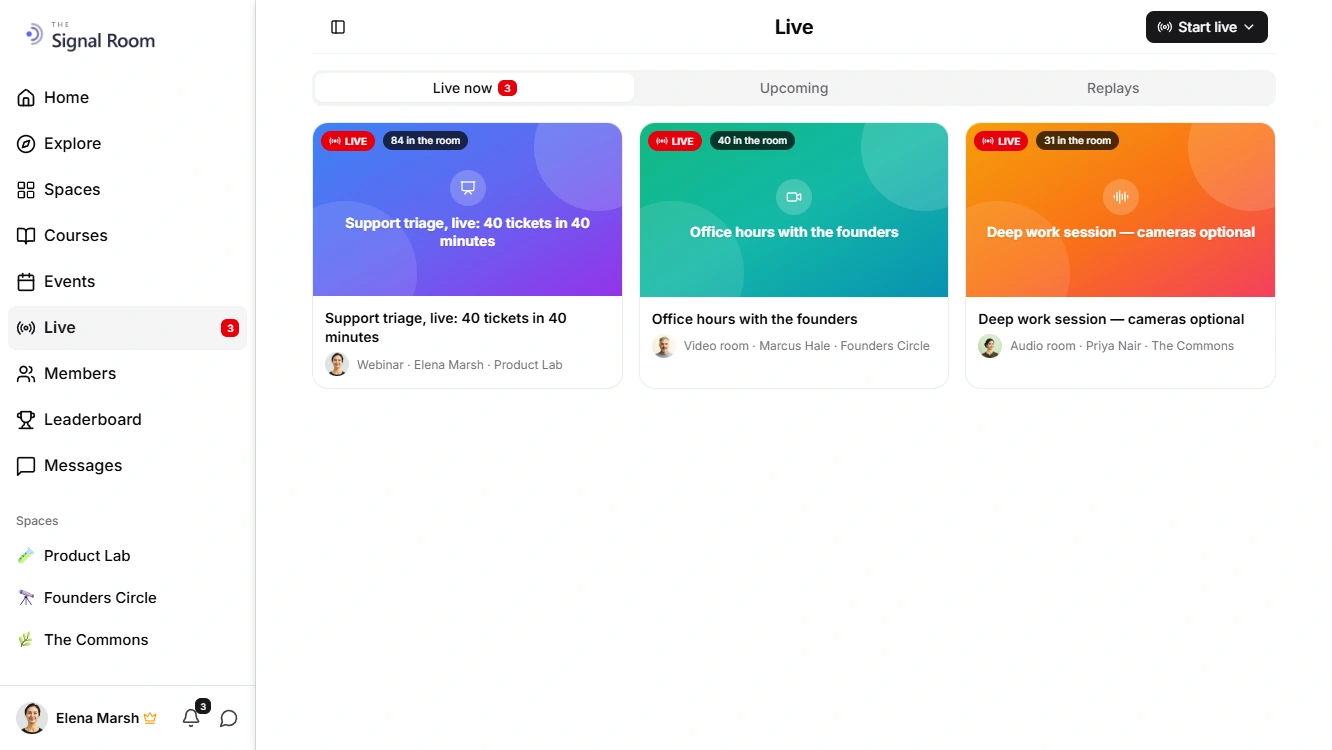
A live session is a community object like any other — it belongs to a space, inherits that space's access rules, and leaves a replay behind.
Pick the shape
A video room where everyone can be seen, an audio room for voice only, or a webinar with a stage and an audience. You choose who can join and who can speak up front.
Set up backstage
Creating a session tells nobody. You land in the room alone, check your camera, microphone and speaker, and open it to the community when you're actually ready.
Open, run, replay
Members join from the web or the mobile app. If you record, everyone is asked to agree first, and the replay is published back into the same space afterwards.
Three shapes
One live system, three ways to use it
The difference is who can be seen and heard — not which product you have to open.
Interactive video room
Everyone who joins can turn on their camera and microphone. Built for cohort calls, working sessions and small-group coaching where the point is the conversation.
Interactive audio room
Voice only, no cameras. The lowest-friction way to run an AMA, an office hour or a casual hangout — nobody has to be camera-ready to show up.
Webinar
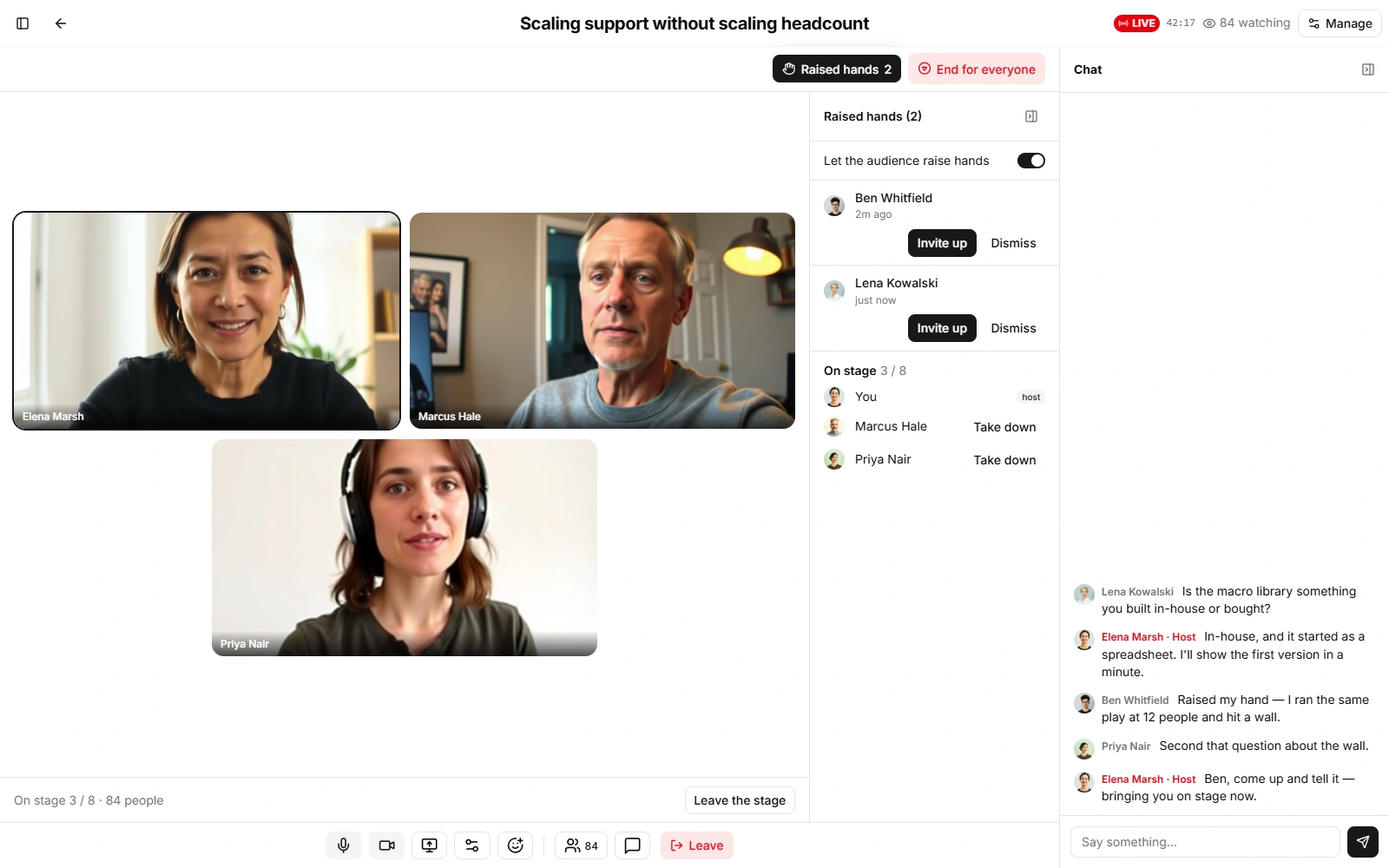
A few people on stage, everyone else watching. The audience can raise a hand, and you invite them up — they still get to accept before anything of theirs turns on.
Capabilities
The parts that make a live session survivable
Hosting is the easy half. These are the controls that decide whether the session goes well.
Browser and mobile, no install
Hosts and members join from the web or the native iOS and Android apps. Nobody downloads a meeting client, and nobody needs an account on another platform.
Who gets in
Open a session to the members of its space, to people you invite by name, or to whoever RSVP'd to the linked event. Access is checked per person, per join.
Stage control and hand-raising
Decide whether everyone can speak or only hosts and speakers. Turn hand-raising on or off, work through the queue, invite people up, and take them back down.
Moderation that works mid-session
Mute one person or everyone at once, promote a speaker or a co-host, spotlight someone for the whole room, remove a participant, or block them for the rest of the session — with a block list you can undo.
Chat with a slow mode
A live chat beside the stage, hosts marked as hosts, and a slow mode you can dial from off up to five minutes between messages when a room gets loud.
Screen sharing
Allow it for hosts and speakers, open it to everyone, or turn it off entirely. The shared screen takes over the stage for everyone watching.
Recording with consent
Recording is never silent: everyone in the room is asked to agree before joining, anyone can opt out and stay in the chat instead, and you start the recording yourself.
Replays that stay yours
A recorded session is published back into the community as a replay — on your domain, in the space it belongs to, behind the same access rules. Not an unlisted link on someone else's video site.
What changes when live stops being a link
The session itself is the same hour either way. Everything around it is what a third-party meeting link costs you.
The audience stays yours
A meeting link sends your members to a platform that now knows who they are. A session on your own domain doesn't introduce anyone to anybody.
The session sits next to its subject
The room lives in the space it belongs to, so the discussion before it and the replay after it are one thread instead of three products.
Access is already decided
A session in a members-only space is members-only, and its replay is too. There's no second guest list to keep in sync, and no link to leak.
Nothing expires into someone else's archive
Replays land in your community under your access rules — not in a cloud recording folder that a plan change can quietly age out.
What communities actually run live
The same three shapes cover most of what a community needs to do in real time.
Cohort calls and office hours
A recurring video room tied to the cohort's space, so the people in the call and the people in the thread are the same list — and the replay catches up whoever missed it.
AMAs and audio hangouts
An audio room takes almost no preparation from anyone. Good for the weekly session that dies the moment it requires everybody to look presentable.
Launches and announcements
A webinar keeps the stage clear while still letting members raise a hand — so questions happen without the session turning into a free-for-all.
Workshops and teaching
Share a screen, bring a participant up to work through their example, and publish the recording into the course or space it belongs to.
What does a live quota actually buy?
Every plan comes with one pool of participant-hours a month — one person in a room for one hour is one participant-hour. Drag the slider to see what that is worth at the session size you actually run.
- Free10 participant-hoursRooms hold up to 10
- Starter60 participant-hours5 hours/month
- Growth180 participant-hours15 hours/month
- Business500 participant-hours41.7 hours/month
- EnterpriseBy contract
One pool, not two quotas that pull against each other — spend it on big sessions or small ones, however the month goes. Audio rooms count at 0.25×; recordings at 5× per hour.
Need more? +100 participant-hours $29 · +500 participant-hours $119. Buy them any time from your community dashboard. The balance rolls over and never expires.
Billing
How live usage is counted
One meter, three rates. Every live minute converts to participant-hours and comes out of the same monthly pool.
| Activity | Basis | Counts as |
|---|---|---|
| Video room or webinar | 1 person × 1 hour | 1 participant-hour |
| Audio room | 1 person × 1 hour | 0.25 participant-hours |
| Recording export | 1 session × 1 hour | 5 participant-hours |
Recording is counted per session, not per person — a one-hour recording costs the same whether two people or twenty were in the room.
Live sessions — frequently asked questions
How live rooms, webinars, recordings and access control work in Mateflow.
No. Live sessions run in the browser, and the native iOS and Android apps join the same rooms. There is no meeting client to download and no separate account to create — members join with the identity they already use in your community.
It comes down to who can be seen and heard. In a video room, everyone who joins can turn on their camera and microphone. An audio room is voice only, with no cameras. A webinar puts a few people on stage while everyone else watches, and the audience can raise a hand to be invited up — they accept before anything of theirs turns on.
Yes, through the space it lives in. A session inherits the access rules of its space, so a room inside a space gated to an access group is restricted to that group automatically — and so is its replay. You can also limit a session to people you invite by name, or to whoever RSVP'd to a linked event.
Only if you choose to record, and never silently — everyone is asked to agree before joining, and anyone who would rather not can stay in the chat instead. You start the recording yourself once the room is open. The finished recording is published back into your community as a replay, on your own domain and behind the same access rules as the session it came from.
Yes. A scheduled session is the same room created ahead of time: it appears under Upcoming for the people who can see it, and you can link it to an event so it picks up RSVPs, reminders and calendar export. Creating it does not open it — the room still starts when you open it.
Mute one person or the whole room, promote someone to speaker or co-host, spotlight a participant for everyone, manage the raised-hand queue, allow or block screen sharing, slow the chat down, remove someone, or block them for the rest of the session. Blocks can be undone from the room's block list.
Run your next session on your own site
Start with a 14-day free trial. Live rooms, webinars and replays are part of the same community your members already belong to.