Automate the repetitive work —and see every run.
Four community triggers, nine actions, conditions and delays in between. Build a rule in the console, test it before it goes live, then read back exactly what fired.
Email actions are not available yet, and moderation events cannot start a rule.
Recipes
Rules you can build today
Every pairing below is one you can save in the builder right now — not an illustration of what a rules engine could theoretically do.
When
A new member joins the community
Then
Send them a welcome notification and add them to your starter space
When
A new member joins — wait three days
Then
Send a follow-up notification to the ones who went quiet
When
A member joins a particular space
Then
Tag them, so later segments know what they came for
When
Someone posts in a space you choose
Then
Notify your moderators and push the event to your own stack by webhook
When
Someone posts
Then
Award points, which feed levels and the leaderboard
When
A member RSVPs to an event
Then
Add them to the space where that session's material lives
How it works
From a repetitive chore to a rule you can audit
Automations live in the admin console: define a rule once, let it respond to community events, and audit every run after the fact.
Define a rule
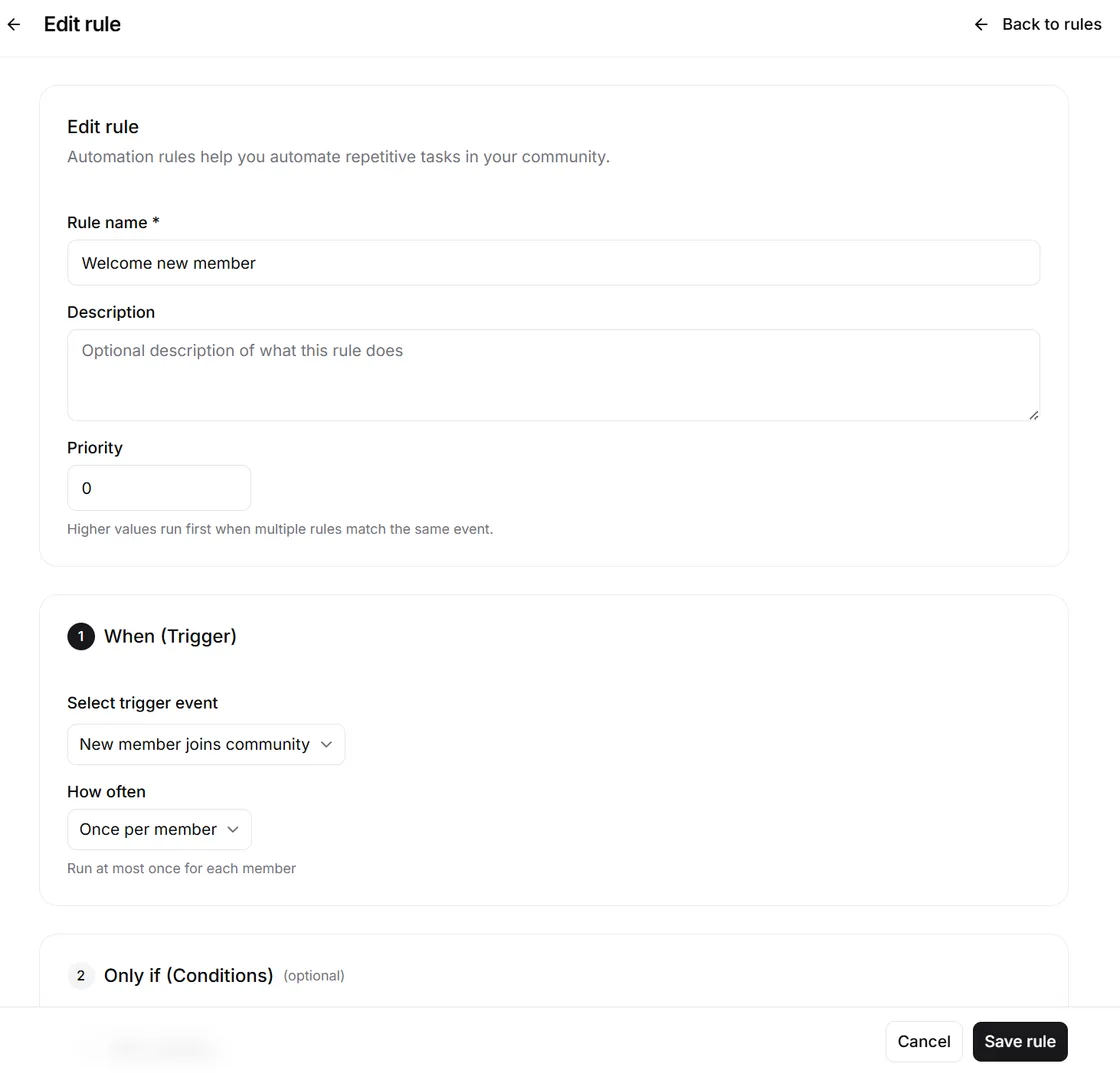
Pick a trigger and pair it with an action in the rule builder — when something happens in your community, do something in response.
Rules respond to events
Rules fire on your community's own activity — onboarding, access, notifications, and moderation — so routine responses happen without you watching the console.
Audit every run
Every rule run is recorded in execution logs. Open any rule for its detail, see exactly what fired and when, and adjust with a quick edit.
Capabilities
A real rules engine, not a black box
Rules, a trigger → action builder, per-rule detail, and a dedicated execution log — the full loop for automating routine community operations.
Rules list
Browse every automation rule for your community in one list, with its trigger, its actions and whether it is currently enabled.
Trigger → action builder
Create a new rule by pairing a community trigger with a response action — no scripts, no external workflow tool.
Rule detail
Open any rule to inspect its configuration — what it listens for, what it does, and how it has been set up.
Edit and iterate
Processes change. Modify an existing rule in place instead of rebuilding the flow from scratch.
Execution logs
A dedicated history of rule runs shows what fired, when, and what it did — so you can verify and debug instead of trusting a black box.
Community-native triggers
Triggers and actions operate on in-community activity — joins, posts, RSVPs, spaces, tags, points — not generic webhooks you wire up yourself.
Triggers and actions
The whole vocabulary, on one screen
Small on purpose. Each one operates on your community's own activity, so a rule reads like the work it replaces.
Four triggers
What starts a rule.
- A member joins the community
- A member joins a space
- A post is created — optionally in one space only
- A member RSVPs to an event
Nine actions
What the rule does in response.
- Send a notification
- Add to a space
- Remove from a space
- Assign a tag
- Remove a tag
- Change a space role
- Award points
- Award a badge
- Send a webhook
Anatomy of a rule
A rule is more than a trigger and an action
The parts in between are what make a rule safe to leave running.
Conditions
Narrow a rule by member tags, how long ago they joined, their points, which space fired it, or the type of content.
Delay
Run immediately, or after a set number of minutes, hours or days — which is what turns a trigger into a follow-up.
Test before it runs
Try a rule against real data and run it by hand before you enable it, instead of finding out on live members.
Execution log
Every run is recorded with what fired, when, and what it did — open any entry for the detail.
Why a native rules engine changes daily operations
Routine work runs itself, every run is provable, and the rules speak your community's language — not a generic integration layer's.
Routine responses run without you
Welcomes, space placement, tagging and notifications fire on their own, so the work that used to need someone watching the console does not.
A log that proves it
Every rule run is captured in execution logs, so you can verify and debug your automations instead of trusting a black box.
Built on your community's events
Triggers and actions operate on in-community activity, so rules map directly to the work you actually do — no glue code in between.
Room to grow
Run up to 10 rules on Growth, 50 on Business, and unlimited rules on Enterprise — the engine grows with your operation.
What operators hand over to rules
The repetitive responses every community runs on — defined once, executed automatically, logged every time.
Onboarding flows
Automate the repetitive welcome and onboarding work you'd otherwise do by hand every time a new member arrives.
Access operations
Wire access changes to community events, so the right people end up with the right access without manual housekeeping.
Notification routines
Trigger notifications in response to community activity, so the right people hear about it without you broadcasting by hand.
New-post routing
Send every new post in a sensitive space to your moderators, and to your own systems by webhook — moderation events cannot start a rule, but the post that needs a look can.
Automations — frequently asked questions
Common questions about Mateflow's event-driven rules engine — triggers, actions, execution logs, and plan limits.
Mateflow Automations is an event-driven rules engine: you pair a trigger with an action so rules handle repetitive work like onboarding, access, notifications, and moderation responses. Rules fire on your community's own events, with every run recorded in execution logs.
No. You create a rule in the trigger → action builder by pairing a community trigger with a response action — no scripts and no external workflow tool. You can also edit an existing rule in place instead of rebuilding the flow from scratch.
Automations are available on the Growth plan and above. You can run up to 10 rules on Growth, 50 on Business, and unlimited rules on Enterprise.
Yes. Every rule run is recorded in a dedicated execution log that shows what fired, when, and what it did. Open any rule for its detail so you can verify and debug instead of trusting a black box.
Four triggers start a rule: a member joins the community, a member joins a space, a post is created (optionally scoped to one space), or a member RSVPs to an event. In response a rule can send a notification, add or remove someone from a space, assign or remove a tag, change a space role, award points or a badge, or send a webhook. Email actions are not available yet.
Hand your routine operations to rules
Start with a 14-day free trial. Automations are included from the Growth plan up.