Teach, certify, and prove it —inside your community.
A full course product built into the community: a searchable catalog, a focused learning player with text, video, file, embed, and quiz lessons, and certificates anyone can verify.
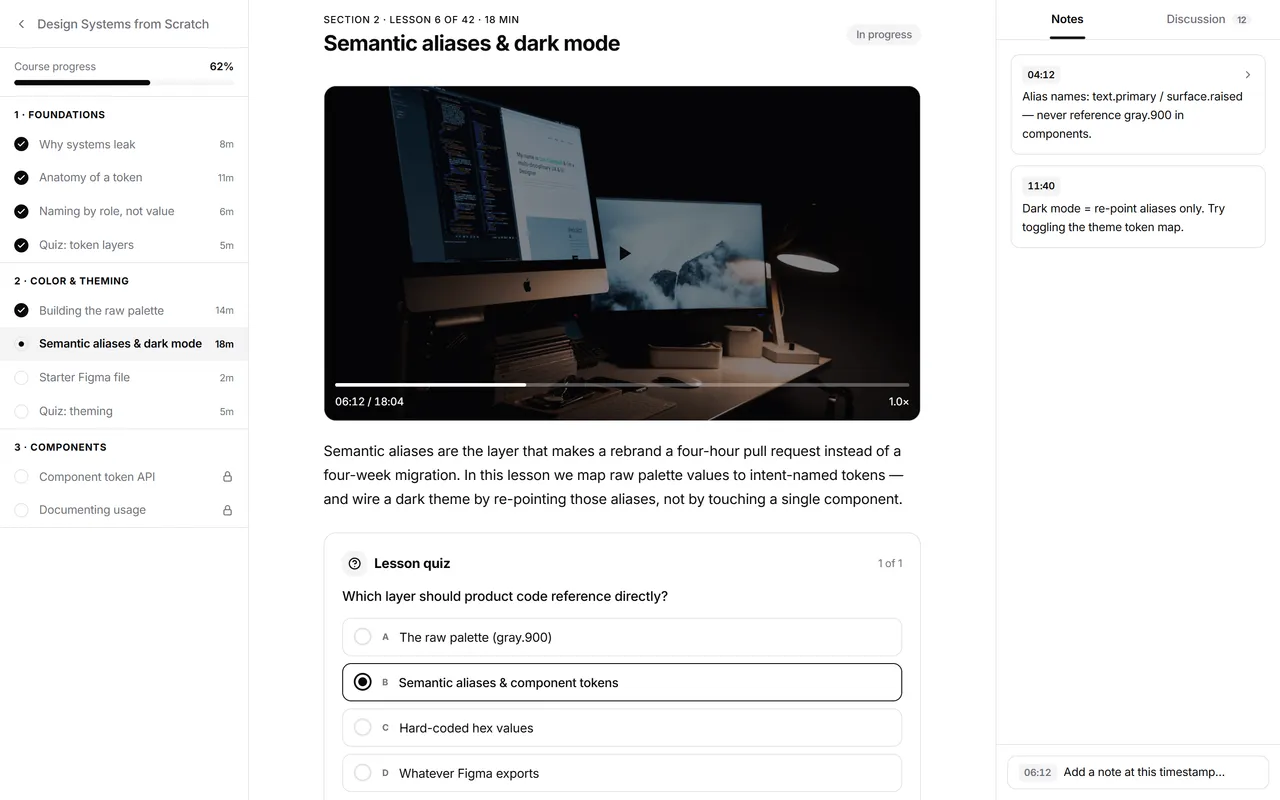
How it works
From curriculum to verified credential
Courses are native to the community — the catalog, learning player, and certificates live in the same product your members already use.
Build your course
Create and manage courses in the admin console: structure lessons as text, video, file, embed, or quiz, then publish to a course page with syllabus, reviews, and instructor info.
Members learn
The learning player walks members through lessons and tracks completion — with personal notes and per-lesson discussion right next to the content.
Certify and verify
Finishing a course earns a certificate with its own public verification page — anyone can confirm the credential by its number, no login needed.
Capabilities
A real learning product, not a content folder
Catalog, player, quizzes, progress, and certificates — every layer of a course product, tied to the same member identity as the rest of your community.
Course catalog & search
Members browse and search every available course in a dedicated catalog — discovery is built in, with no link lists to maintain.
Rich course pages
Each course shows its syllabus, reviews, and instructor info before enrollment, so members know exactly what they're signing up for.
Text, video, file, embed & quiz lessons
Mix five lesson types in one focused learning player, with lesson navigation and completion tracking across all of them.
Quizzes that gate progress
Test understanding with quiz lessons members answer to move forward — so completion reflects real learning, not just clicks.
Notes & lesson discussion
Members take personal notes against any lesson and discuss it in a side panel — questions stay next to the content they're about.
My Courses & progress
Every member sees their enrolled courses and completion status in one place, so picking up where they left off takes one click.
Completion certificates
Finishing a course earns a certificate, collected on the member's My Certificates page as a lasting record.
Public verification
Every certificate carries a public verification page. Anyone can check a credential by its number — no login, no account.
Built-in courses vs a separate LMS
Bolting an external LMS onto your community splits identity, progress, and conversation across two products.
| Dimension | Mateflow Courses | Separate LMS + community tool |
|---|---|---|
| Course delivery | Inside the community — one product, one login | Second product, second login |
| Lesson types | Text, video, file, embed, and quizzes in one player | Varies by tool and pricing tier |
| Progress tracking | Tied to the same member profile as posts and tiers | Separate student account and data |
| Lesson discussion | Side panel next to every lesson | Comments in another tool, context lost |
| Certificates | Issued on completion, collected in My Certificates | Add-on or third-party service |
| Certificate verification | Public verify page anyone can check | A PDF with no way to confirm it |
| Monetization | Membership perk or paid product on the same billing | Separate checkout, manual access syncing |
Why native courses change the learning experience
When the course product and the community are the same product, learners stay, credentials mean more, and operations get simpler.
Courses live where members are
Catalog, player, and discussion share the community's identity and access rules — no second product to adopt, no drop-off between tools.
Credentials anyone can check
Every certificate has a public verification page reachable by its number, so a member can prove completion to an employer or client without going through you.
Five lesson types, one player
Text, video, file, embed, and quizzes with notes, discussion, and completion tracking — a full learning loop, not just hosted video.
Perk or product — your call
Courses ride the same membership and billing rails as the rest of the platform, so you can include them with membership or sell them.
What communities build with Mateflow Courses
From flagship paid programs to onboarding tracks, the same course layer covers each model.
Flagship paid courses
Sell structured programs without a separate LMS — the catalog, learning player, and membership billing all live in your community.
Cohort-based programs
Pair a structured curriculum with the spaces, events, and discussions your cohort already uses every day.
Customer education
Turn product knowledge into self-serve learning tracks with quizzes and completion tracking, right inside your customer community.
Certification programs
Run programs that end in a verifiable credential — employers and clients can confirm any certificate by its number.
Courses — frequently asked questions
How Mateflow runs courses: lesson types, certificates, verification, and pricing.
Courses mix five lesson types — text, video, file, embed, and quizzes — in one focused learning player, with lesson navigation and completion tracking across all of them.
Yes. Finishing a course earns a completion certificate, collected on the member's My Certificates page, and every certificate has a public verification page anyone can check by its number — no login or account needed.
No. The catalog, learning player, quizzes, progress, and certificates live inside your community on the same member identity and billing, so there is no second product, second login, or synced student data.
Both. Courses ride the same membership and billing rails as the rest of the platform, so you can include a course as a membership perk or sell it as a paid product.
Courses are included from the Starter plan, which covers a set number of them. Growth and above include unlimited courses, with no per-course charge. The pricing page lists the current allowance for each plan.
Keep learning
Related guides & resources
Bring your courses into your community
Start with a 14-day free trial. Starter includes 3 courses; Growth and above are unlimited.