Operational depth,built for operators.
Most community platforms stop at a dashboard. Mateflow gives operators a real working layer across members, moderation, analytics, monetization, AI, and governance.
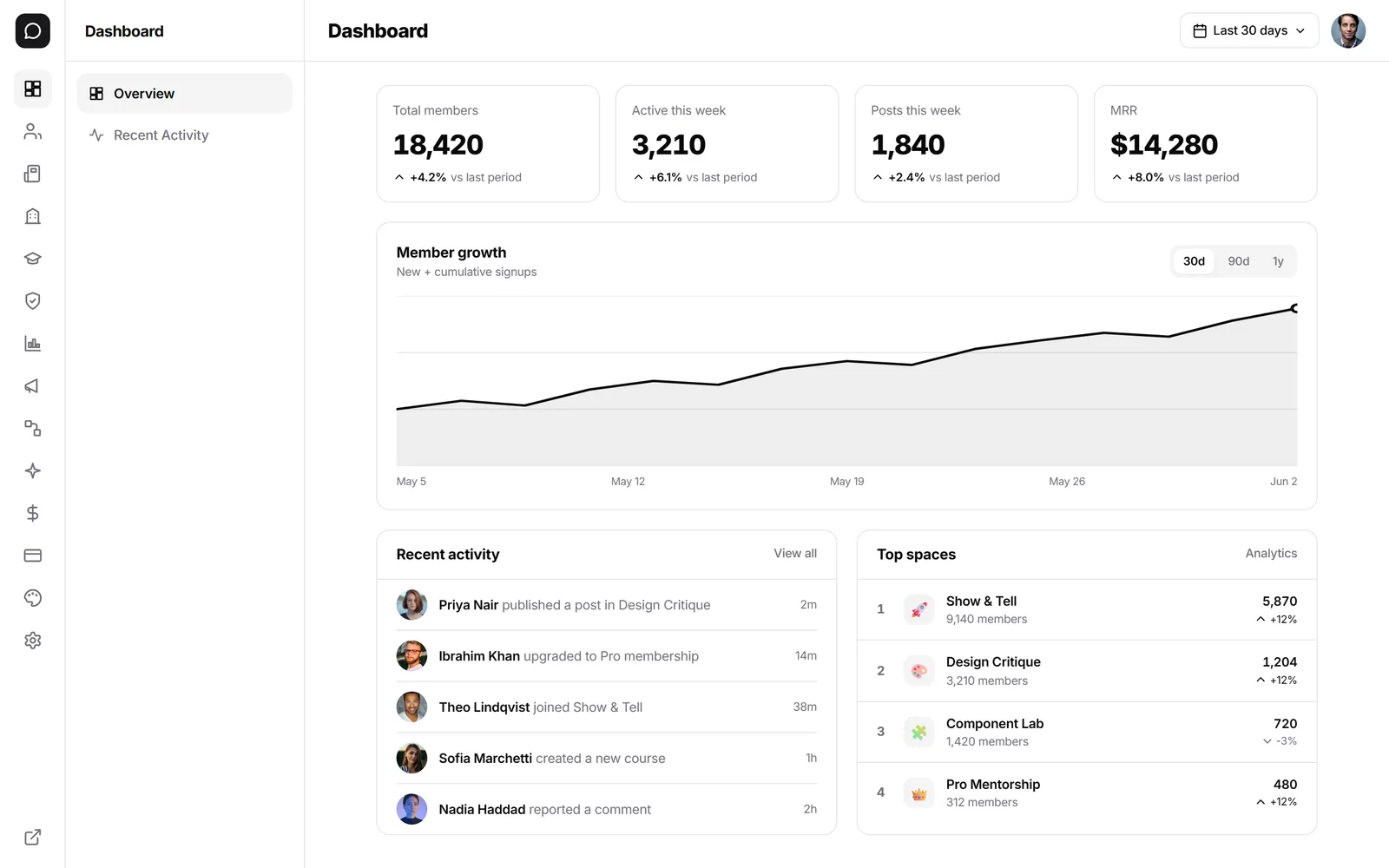
Illustrative figures from a sample community, not customer results.
Operations modules
Everything you need to run a community at scale
These are operational surfaces, not cosmetic settings panels. Each module is built for ongoing operation — not just initial setup.
Members and access
Manage invitations, imports, membership state, roles, and access decisions without hunting across disconnected settings surfaces.
Content and structure
Control posts, spaces, events, categories, and collections from a console built for ongoing operation — not just initial setup.
Moderation and auditability
Use report queues, automated moderation rules, AI-assisted review, and audit logs to keep the community healthy at scale.
Analytics and marketing
Track engagement, content performance, and member activity, then act on it through broadcasts and operational follow-through.
Monetization and billing
Run subscription plans, revenue workflows, and billing-aware operations as part of the same system.
AI and advanced settings
Configure AI behavior, integrations, SSO, onboarding, localization, and policy-level settings without leaving the admin environment.
Permission model
Three-layer RBAC: Platform · Community · Space
Roles compose, they don't conflict. A space owner can moderate their space without touching community-wide settings. A community admin can delegate without giving away the keys to the platform.
| Capability | PPlatform Owner | SCommunity Admin | MCommunity Moderator | OSpace Owner |
|---|---|---|---|---|
| Billing & plan | ||||
| Custom domain & branding | ||||
| Member roles & invites | ||||
| Moderation queue | Own space | |||
| Audit log | ||||
| Manage own space content | ||||
| Create new space | ||||
| Post & reply |
SSO (SAML + OIDC) is available on Business and Enterprise plans for centralized sign-on across these roles.
Moderation queue
Reports, evidence, and action — in one workspace
Member reports land in a single queue with context: the offending content, the reporter, the rule that fired, and one-click actions tied to the audit log.
“…this is total b******t, who even built this thing”
Profanity · 12 min ago
“Get 50% off my course — DM me for the link! 🚀”
Off-topic promotion · 12 min ago
“Check out my new launch → bit.ly/launch-xyz”
4 identical replies in 30s · 12 min ago
Every action writes to the audit log with actor, reason, and timestamp.
View audit log →Full operations vs basic dashboard
The operating layer becomes a major differentiator as soon as the community has real members, real workflows, and more than one person running it.
| Dimension | Mateflow Operations | Creator-only / basic dashboard |
|---|---|---|
| Member management | Roles, tiers, tags, bulk actions, CSV import/export | Flat member list, often no bulk actions |
| Moderation | Report queue, auto-mod rules, AI review, audit log, appeals | Manual review or flag-and-hope |
| Permissions (RBAC) | Three layers: Platform · Community · Space | Single admin/member toggle |
| Analytics | Engagement, content, revenue, retention in one console | Page views or basic activity counts |
| Governance | Audit trail, session management, policy controls | No governance layer |
| Team workflow | Multiple admins with scoped roles + handoff trails | Owner + maybe one moderator |
Why the operating model changes the product fit
The operating layer becomes a major differentiator as soon as the community has real members and more than one person running it.
Run the community like a product
Most alternatives stop at a dashboard. The Mateflow admin model is designed for teams that need a real operational console after launch.
Admin vs creator layers
Community admin handles day-to-day operation while the Creator Dashboard stays focused on cross-community billing, teams, and account-level setup.
Make governance easier to sustain
As the team grows, the ability to find settings, review actions, and understand what happened becomes as important as feature breadth.
Product and operation together
Members, moderation, content, AI, analytics, and revenue all sit inside the same system instead of being scattered across vendors.
Signs you need deeper operating control
If these sound familiar, a creator-only dashboard is probably not enough.
Beyond a basic dashboard
If "admin" means members, moderation, analytics, campaigns, settings, and governance — this is the product shape you need.
Stronger than creator-only tools
Creator-first platforms optimize for publishing and monetization. Mateflow puts heavier weight on the operator workflow too.
Useful from day one
The console is available from the start, so operational debt does not pile up until the team is already under pressure.
Admin & operations — frequently asked questions
How Mateflow's admin console, roles, SSO, moderation, and member management work across plans.
Yes. The admin console is included on every plan, so you get members, moderation, analytics, and settings from day one. Content approval and audit logs unlock on Business, and custom roles (RBAC) are available on Enterprise.
Roles compose across three layers — Platform, Community, and Space — so they combine rather than conflict. A Space Owner can moderate their own space without touching community-wide settings, while a Community Admin can delegate without handing over the whole platform.
Yes. SSO with SAML and OIDC is available on the Business and Enterprise plans, giving centralized sign-on across the Platform Owner, Community Admin, Community Moderator, and Space Owner roles.
Member reports land in a single queue with full context — the offending content, the reporter, and the rule that fired — plus one-click actions. Every action writes to the audit log with actor, reason, and timestamp.
Yes. The members and access module handles invitations, imports, and membership state, with support for roles, tiers, tags, bulk actions, and CSV import/export.
Run your community with real operational control
Start with a 14-day free trial. The admin console is there from day one — governance depth scales with your plan.