Events that live insideyour community.
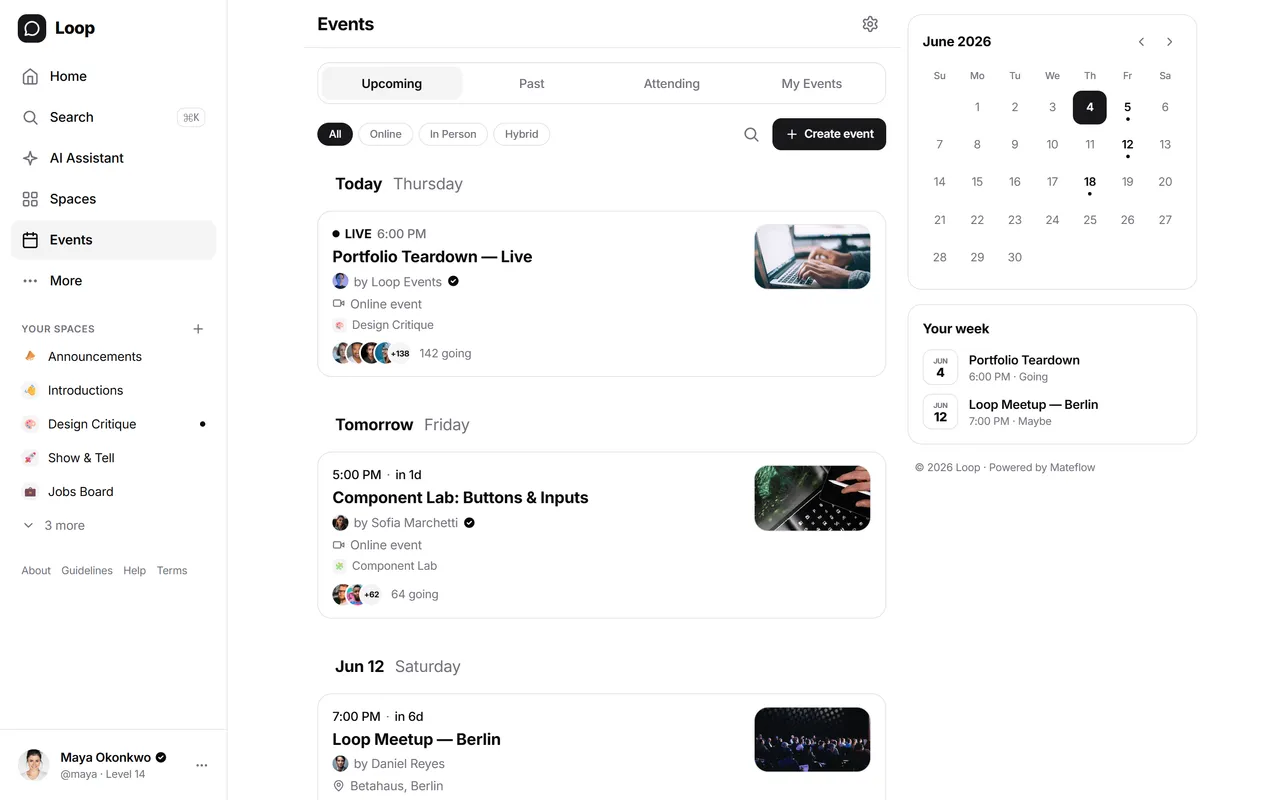
Run creation, RSVP, reminders, and attendance inside the same product your members already use — instead of sending them to a separate event tool.
How it works
From idea to a full event page in minutes
Events are first-class community objects — not a bolt-on integration that fragments the member experience.
Create your event
Set title, date, time, location, banner, and capacity. Tie the event to a space so it reaches the right audience automatically.
Members RSVP
Members register directly inside the community. Attendance, reminders, and follow-up all stay in one product.
Run it and follow up
Run it live in the community — a video room, audio room or webinar — or in your own tool, or in person. Either way the conversation carries on in the space where the event lives.
Capabilities
A complete events system, not just a calendar
Events are integrated with spaces, member tiers, and notifications — so the full lifecycle stays inside one product.
Full event lifecycle
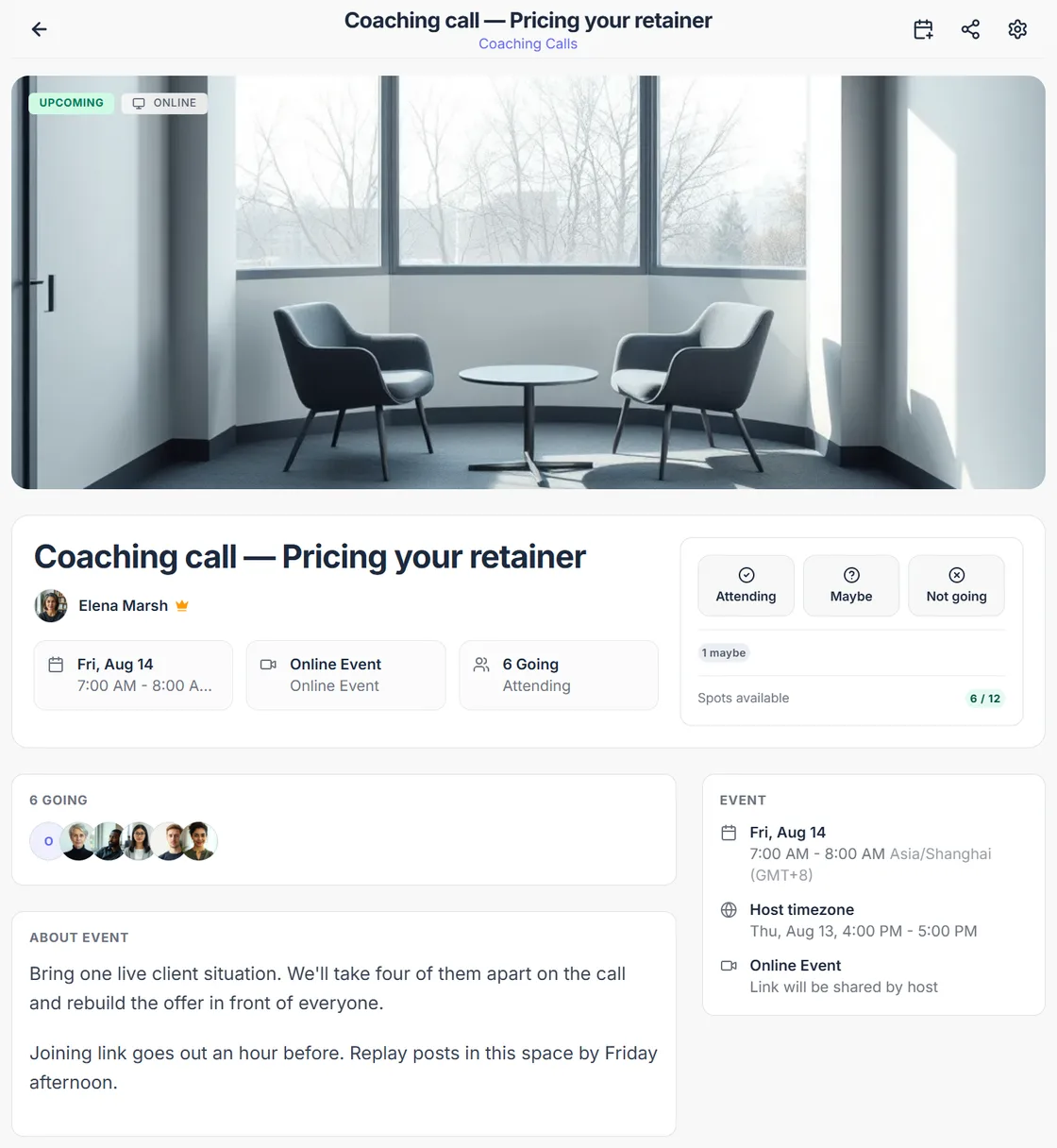
Title, description, banner, location, capacity, timezone, virtual/in-person — covered from creation through follow-up in one workflow.
Recurring & series events
Schedule weekly office hours, monthly cohort calls, or a 6-week workshop series. Edit one occurrence or the whole series — members see all future dates.
Calendar sync (Google · Outlook · Yahoo · .ics)
One-click "Add to calendar" sends the event to Google, Outlook or Yahoo, downloads an .ics for Apple Calendar, or copies the raw iCal — with timezone, location and the join link. Updates propagate automatically.
RSVP & attendance
Members RSVP from their profile. Capacity, waitlist, and attendance tracking stay tied to the same identity used for posts and tiers.
Space integration
Tie events to a space so the right cohort, premium group, or topic-based community sees what matters — no manual audience-segmenting.
Access control & paid events
Events inherit the access rules of the space they live in, so an event inside a tier-gated space is members-only without configuring anything twice.
Reminders & notifications
Automated email, in-app, and mobile push reminders 24 hours before, 1 hour before, and at the event start time. No manual chasing, no missed sessions.
Virtual & in-person
A live room hosted in your own community, a Zoom or Google Meet link, or a physical address — every event type is first-class, with the same RSVP + reminder flow.
Event lifecycle
Everything around the call, handled
Whether you run the session in a live room here or in a tool of your own, this is the part Mateflow takes off your hands.
Create
Online, in person or hybrid, with its own timezone and cover. Tie it to a space, announce it to that space's feed on publish, and repeat it weekly, fortnightly or monthly as a series.
RSVP
Going, maybe, or not — and members can bring guests up to a limit you set. Set a capacity and anyone past it moves to the waitlist automatically.
Remind and run
One-click calendar sync — Google, Outlook, Yahoo or an .ics download — automated reminders as it approaches, and either a live room hosted in your community or your own Zoom or Meet link on the event page.
After
Check attendees in, post the replay with a time it becomes available, and keep the follow-up conversation in the space the event belongs to.
Editing a recurring event asks whether you mean this occurrence or this one and every one after it.
Why integrated events change the product experience
When events are native, the member experience becomes more coherent and the team's operational load gets lighter.
Stop splitting attention across tools
When events live elsewhere, the member experience fragments and participation drops because people forget another product.
Keep events next to the conversation
The event belongs alongside the discussion, resources, and audience it serves — not in a disconnected calendar app.
Tie sessions to access rules
Premium sessions, cohort calls, and community-only events are easier to manage when access control lives in the same platform.
Reduce manual operations
Reminders, visibility, and RSVP flow become product behavior instead of another repeated manual task for the team.
What communities run with Mateflow Events
The event layer works across creator, brand, and education use cases because it is tied to the broader platform model.
Live Q&As and AMAs
Run recurring member sessions that stay close to the conversation threads they extend — with reminders and the follow-up discussion attached to the event itself.
Cohort sessions
Use events as the schedule layer for cohort-based programs and educational communities with built-in attendance tracking.
Workshops and classes
Support structured learning or training programs without building around a separate event stack.
Meetups and launches
Use the same platform for community gatherings, customer sessions, and product moments that need a coordinated audience.
Events — frequently asked questions
How Mateflow runs recurring events, calendar sync, paid access, reminders, and RSVP.
Yes. You can schedule weekly, monthly, or multi-week series events and edit a single occurrence or the whole series at once — members see all upcoming dates.
Yes. One-click "Add to calendar" sends an event to Google, Outlook or Yahoo, downloads an .ics for Apple Calendar, or copies the raw iCal content, each carrying timezone, location and the join link — and updates propagate automatically.
Yes — by putting the event in a space that is gated to a tier. Events have no separate paywall of their own: they inherit their space's access rules, so a members-only space makes its events members-only too. Member tiers and paid memberships are available on every plan, and events are unlimited on every plan.
Both are first-class. A live room hosted in your own community, a Zoom or Google Meet link, and a physical address are all handled the same way, with the same RSVP and reminder flow for every event type.
Yes. Automated email, in-app, and mobile push reminders go out 24 hours before, 1 hour before, and when the event begins, so there is no manual chasing and no missed sessions.
Bring your events into your community
Start with a 14-day free trial. Events are part of the platform experience from day one.