Run your communityby asking.
Mateflow Assistant lives in your admin. Ask for your numbers, what's waiting for you, or a change you need, and it drafts the steps. Nothing changes until you confirm. On every plan, Free included, with no usage limit.
Every time you open it
Start with what needs you today
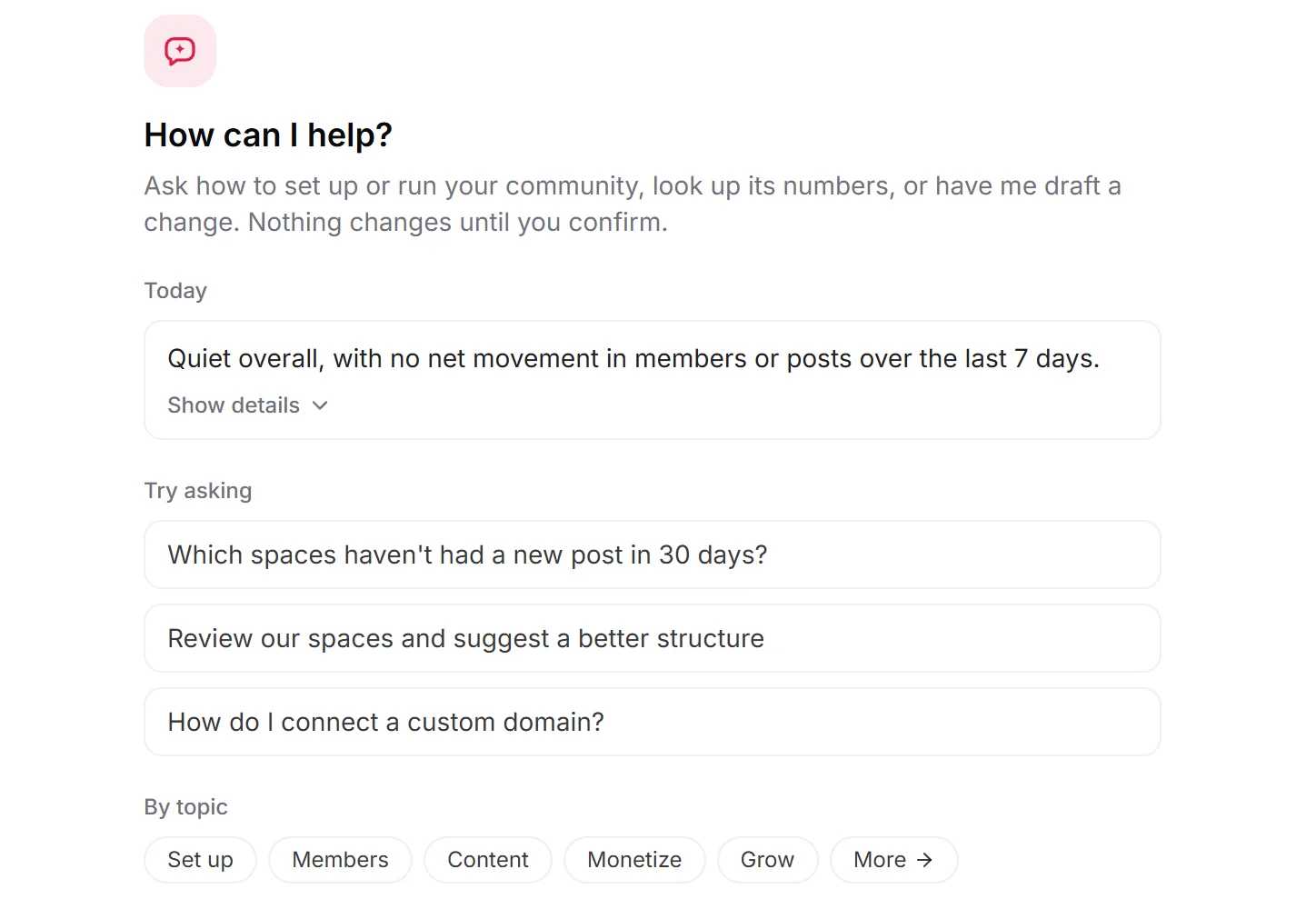
The assistant opens on a Today card: a short brief on how your community is moving, and anything waiting for you, from reports and posts to review to appeals and requests to join a space. Each line takes you to the page where you deal with it.
Ask about your community
Your numbers, without opening a report
Ask in plain words. Answers come from your community's own data and the Mateflow help center, and link to the page they're about.
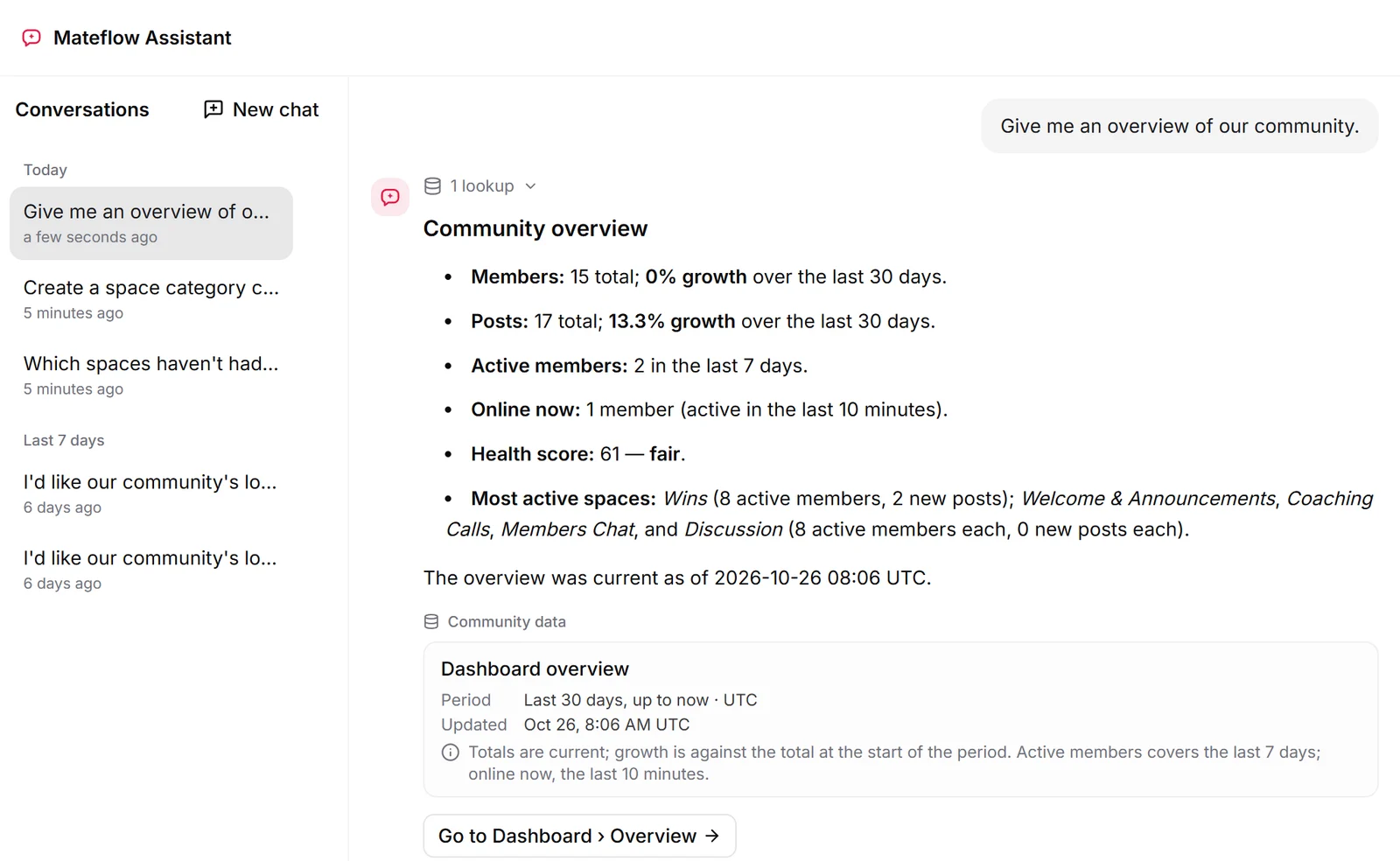
Your community at a glance
Members and posts with their growth, active members, who's online, the busiest spaces and a health score.
Trends over time
New members, active members or new posts by day, week or month, up to 365 days back.
Quiet spaces
Each space's members, posts and recent activity, so the quiet ones stand out.
A member's history
Role and status, when they joined and were last active, their posts, tags and access groups, and the last moderation actions on them, with who took them and why.
Revenue and your plan
Paid membership revenue such as MRR, churn, trial conversion and lifetime value, plus your own plan's usage against its limits and your next billing date.
How-to answers
How to set up and run your community, answered from the Mateflow help center with sources, including where a setting lives and which plan it needs.
Hand over the busywork
Describe the change. Check the plan. Confirm.
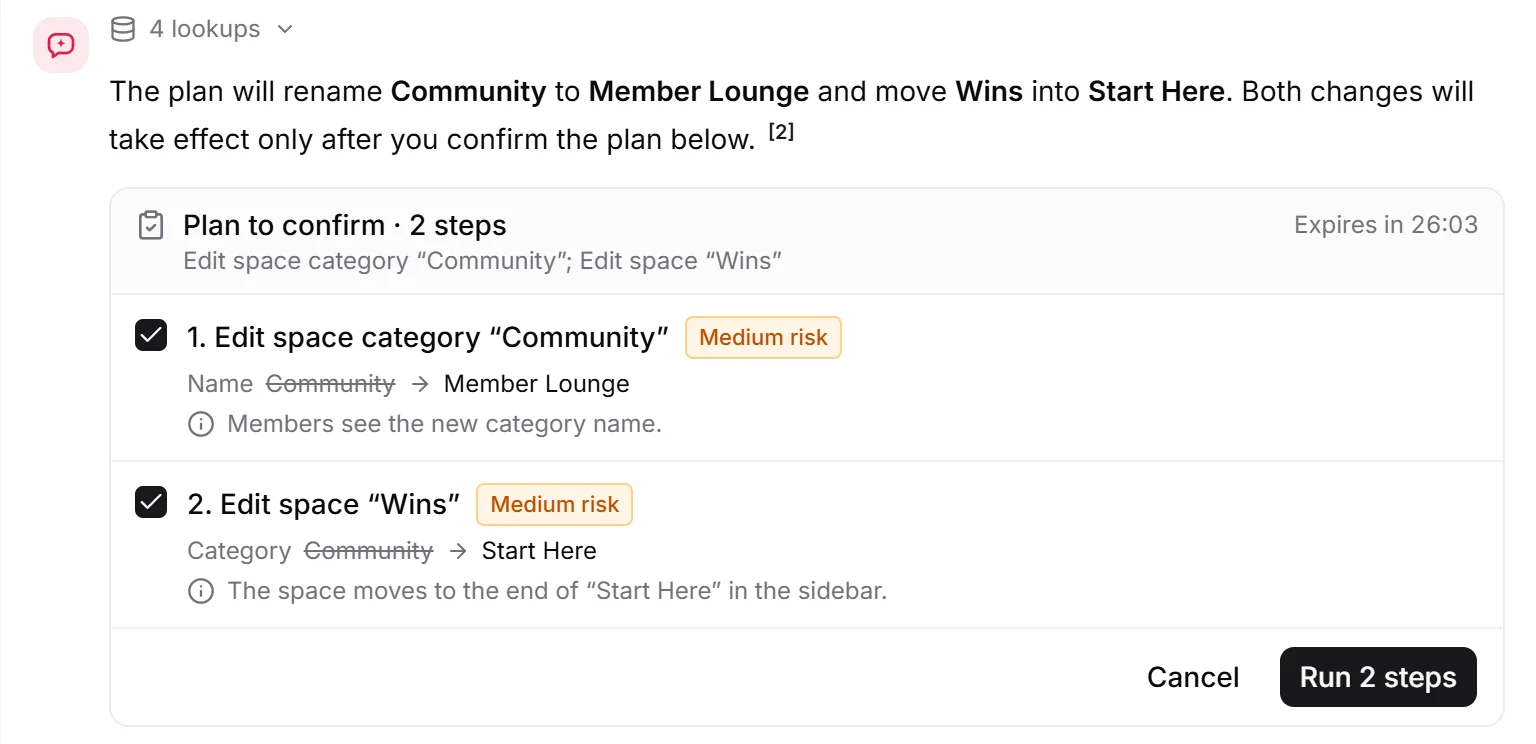
Ask for a change and the assistant drafts a plan: every step, what it changes from and to, and how risky it is. Untick the steps you don't want, then run the rest or cancel.
Spaces and categories
Design a structure of categories and spaces over the conversation and create it in one go. Rename, hide or reorder categories; edit or move a space, or turn its Events or Live on or off.
Posts and Q&A
Pin, hide or lock a post, and undo any of these. Close a Q&A question, or reopen it.
The review queue
Approve up to 20 pending posts or articles at once. Resolve up to 20 reports: dismiss them, or remove what was reported.
Members
Approve up to 20 join requests at once, and give a member a tag you already have.
Community settings
Your community's name, description, tagline, default timezone and default language.
Automations
Install an automation template as a new rule, left off until you set it up, or turn a rule off.
Match your brand
Make your community look like your website
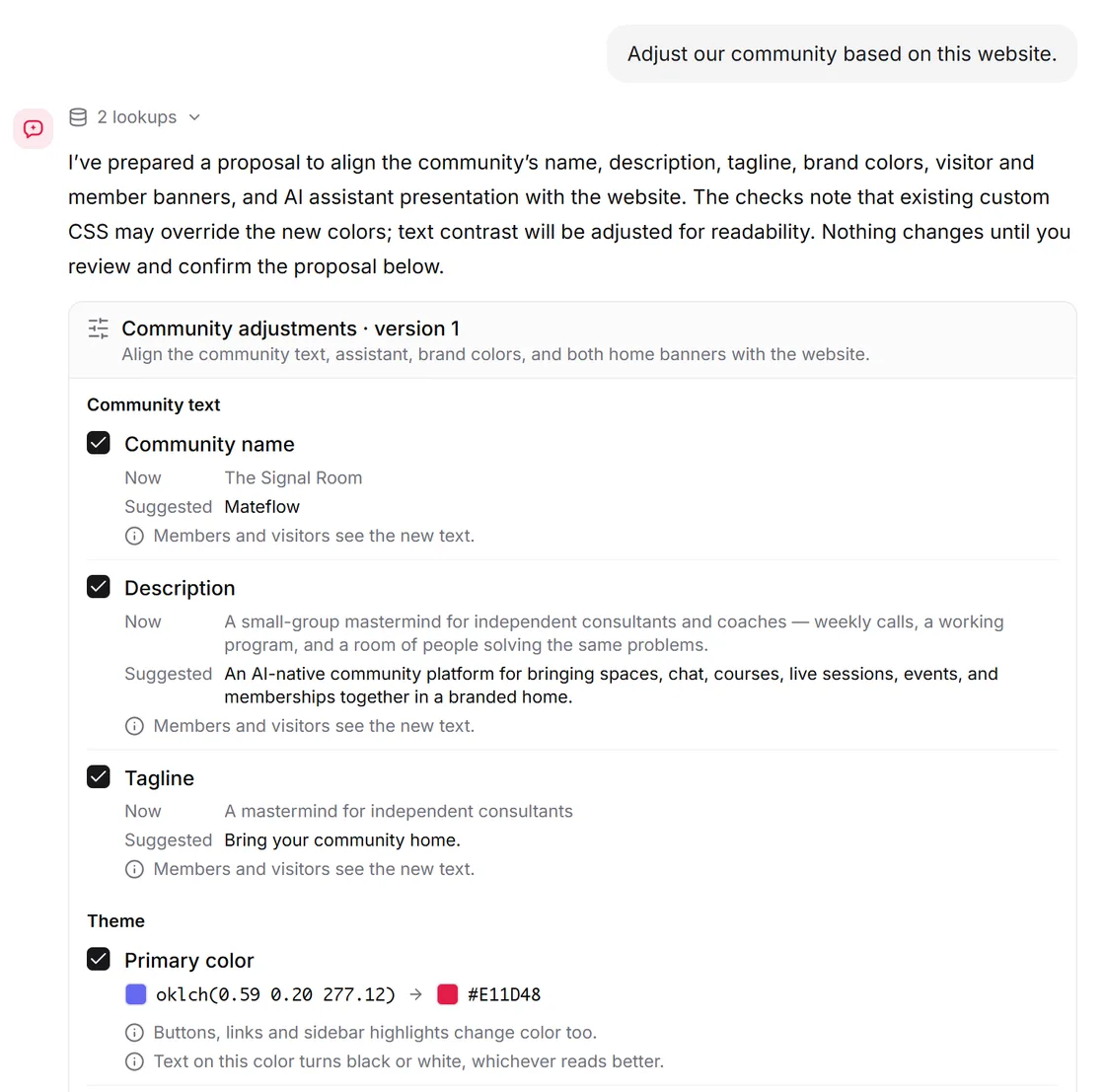
Give the assistant a website. It compares the site with your community and suggests text, colors and fonts, banner copy, footer social links and AI Copilot's name and greeting. Pick the suggestions you want; these changes can be undone for 7 days.
Works with AI Copilot
Close the gaps in what members can ask
AI Copilot answers your members from your community's content and keeps track of the questions it couldn't answer well. Mateflow Assistant helps you close those gaps.
See what members couldn't get answered
Ask the assistant which questions AI Copilot answered poorly. It lists them, most asked first.
Tell it the answer
Give the answer in your own words, and the assistant drafts a Q&A entry for your knowledge base.
Check it and switch it on
The entry is saved switched off. Review it in the knowledge base and turn it on, and AI Copilot can answer from it.
You stay in charge
Nothing changes until you confirm
The assistant proposes; you decide. Every change is shown before it runs and recorded after.
A plan before every change
Each step shows what it changes from and to, with higher-risk steps marked. Untick a step, run the rest, or cancel.
Every change in the audit log
Confirmed changes are recorded in the admin audit log, and you can ask the assistant to list only the changes it made for you.
Undo where it can
Look and AI Copilot changes can be undone for 7 days. Some changes, such as creating a space or approving members, can't be undone from the assistant, so check those steps before you run them.
Only what you can see
The assistant works within your own admin role. What your role can't see or change, it can't either.
What it leaves to you
Some decisions stay in your hands, on purpose.
Warnings, suspensions and bans
Penalties, role changes and rejecting join requests are yours to do in the admin.
Deleting and rejecting
It removes content only when resolving a report. Deleting other posts, rejecting pending posts and approving events stay manual.
Payments
Paid membership plans, prices and coupons, and connecting your payment account, are set up by hand.
Logos, CSS, domain and permissions
Logos and images, custom CSS, your custom domain, and each space's privacy and permissions stay manual.
Plans
On every plan, Free included
Mateflow Assistant isn't an upgrade or an add-on. Every community gets all of it.
The same on every plan
Free gets the full Mateflow Assistant, with everything the paid plans have.
No usage limit
Ask as often as you need. There is no cap on conversations with the assistant.
Separate from AI Copilot
Using the assistant doesn't use up your members' monthly AI Copilot allowance.
Reading a website has its own daily allowance, which resets each day.
Mateflow Assistant — frequently asked questions
What the admin assistant does, what it leaves to you, and which plans include it.
Every plan, Free included. The assistant is the same on every plan, with no usage limit, and using it doesn't count against your members' monthly AI Copilot allowance. Reading a website has its own daily allowance.
No. It drafts a plan that shows every step and what it changes, with higher-risk steps marked, and nothing changes until you confirm. Confirmed changes are recorded in the admin audit log.
Look and AI Copilot changes, such as theme colors and fonts, banner text, footer social links and AI Copilot's greeting, can be undone for 7 days. Some changes, such as creating a space or approving members, can't be undone from the assistant, so check those steps before you run them.
Your community at a glance, member and post trends up to 365 days back, each space's activity, a member's history, what's waiting for review, paid membership revenue such as MRR and churn, your plan's usage, and the audit log. Answers link to the page they're about.
AI Copilot answers your members from your community's content and knowledge base. Mateflow Assistant works for admins in the admin console: it looks up your numbers and drafts changes for you to confirm. It can also list the questions AI Copilot couldn't answer well and draft knowledge-base entries from your answers.
Warnings, suspensions, bans and role changes; deleting posts that weren't reported and rejecting pending posts; paid membership plans, prices and coupons; and logos, images, custom CSS, your custom domain, and each space's privacy and permissions.
Run your community by asking
Start with a 14-day free trial. Mateflow Assistant is in your admin from day one, on every plan, Free included.