Your community's AI,grounded in your knowledge.
Upload your docs, index community discussions, and give every member an AI copilot that knows your content — not generic training data. Included on every plan, not an enterprise upsell.
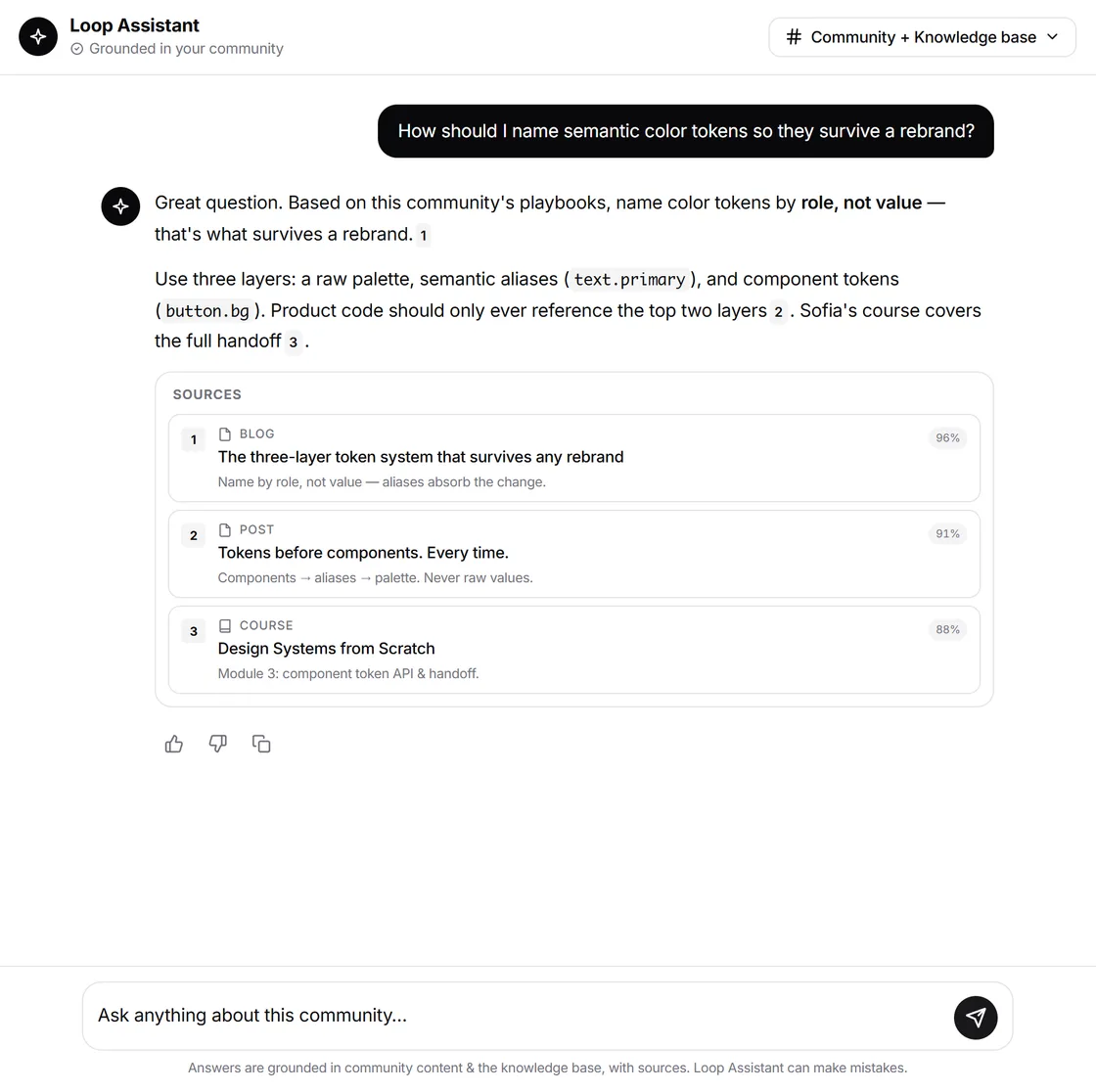
Live example. Real answers cite real sources — your docs and your community's indexed conversations.
How it works
From documents to answers in three steps
The AI Copilot turns your existing knowledge into an always-available assistant for every community member.
Upload your knowledge
Add PDFs, URLs, internal documents, and files to the Knowledge Base. The AI ingests and indexes everything into a searchable vector store.
Index community content
Turn on community indexing. Posts, blogs, discussions, and events become part of the AI knowledge graph automatically.
Members get answers
Members ask questions in the built-in AI chat. The copilot answers from your knowledge, cites its sources, and logs every question so you can see where the gaps are.
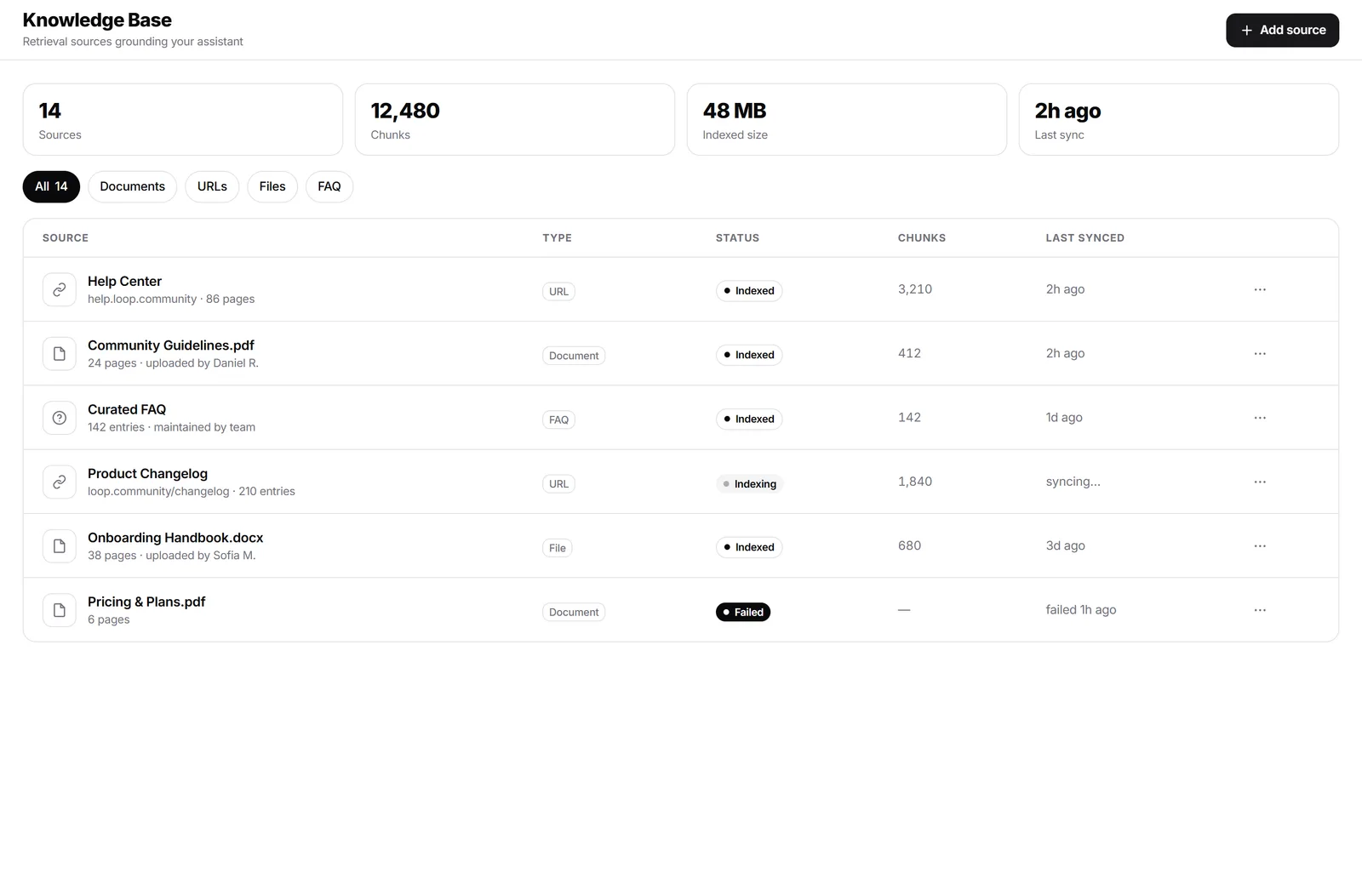
The loop
Every question is logged — and the weak answers become your next article
This is the part that separates an assistant you can improve from a chat box you cannot. You see what members asked, how confident the answer was, and what it handled badly — then close the gap without leaving the console.
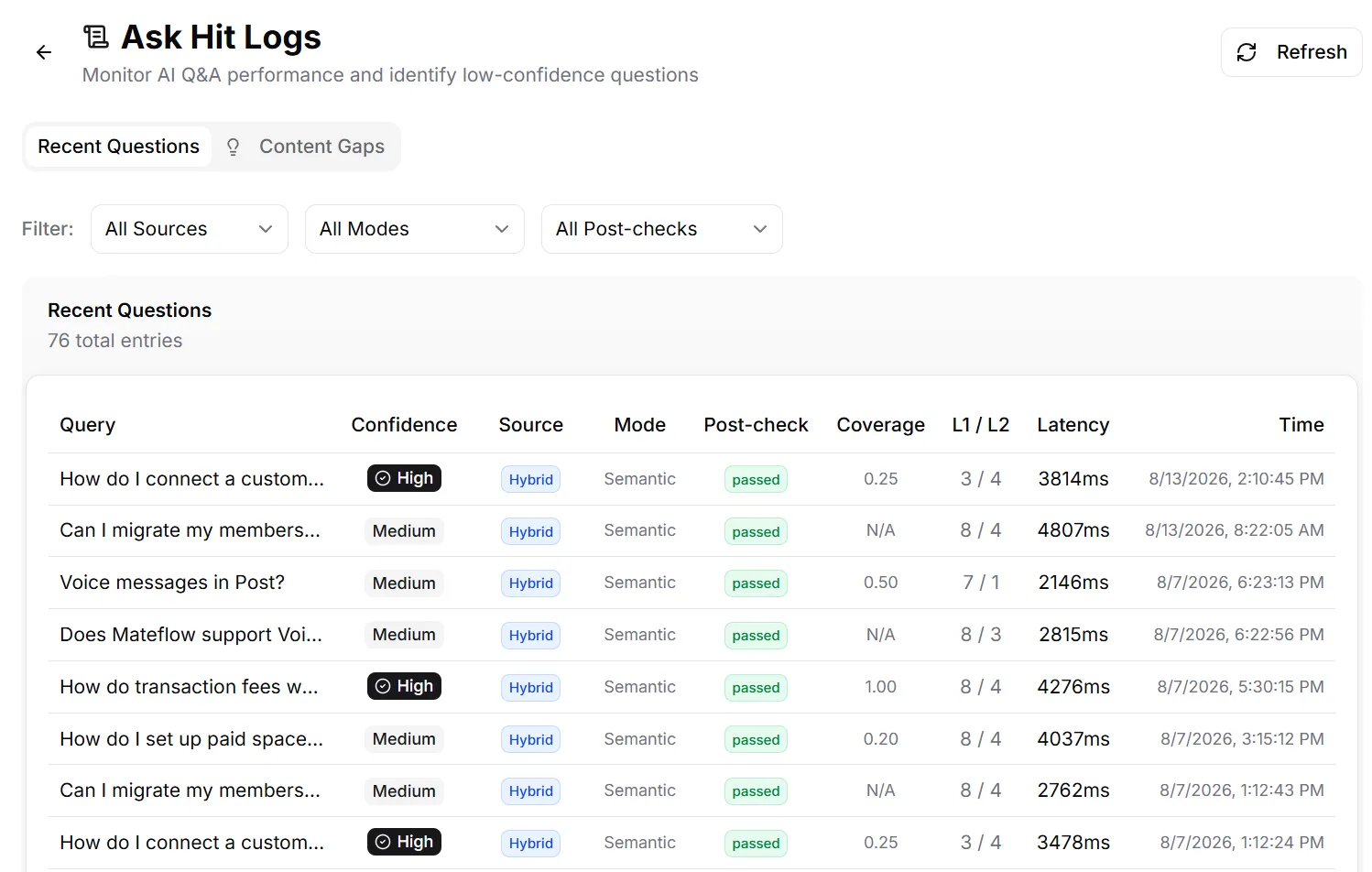
Confidence, coverage, retrieval mode and latency, per question.
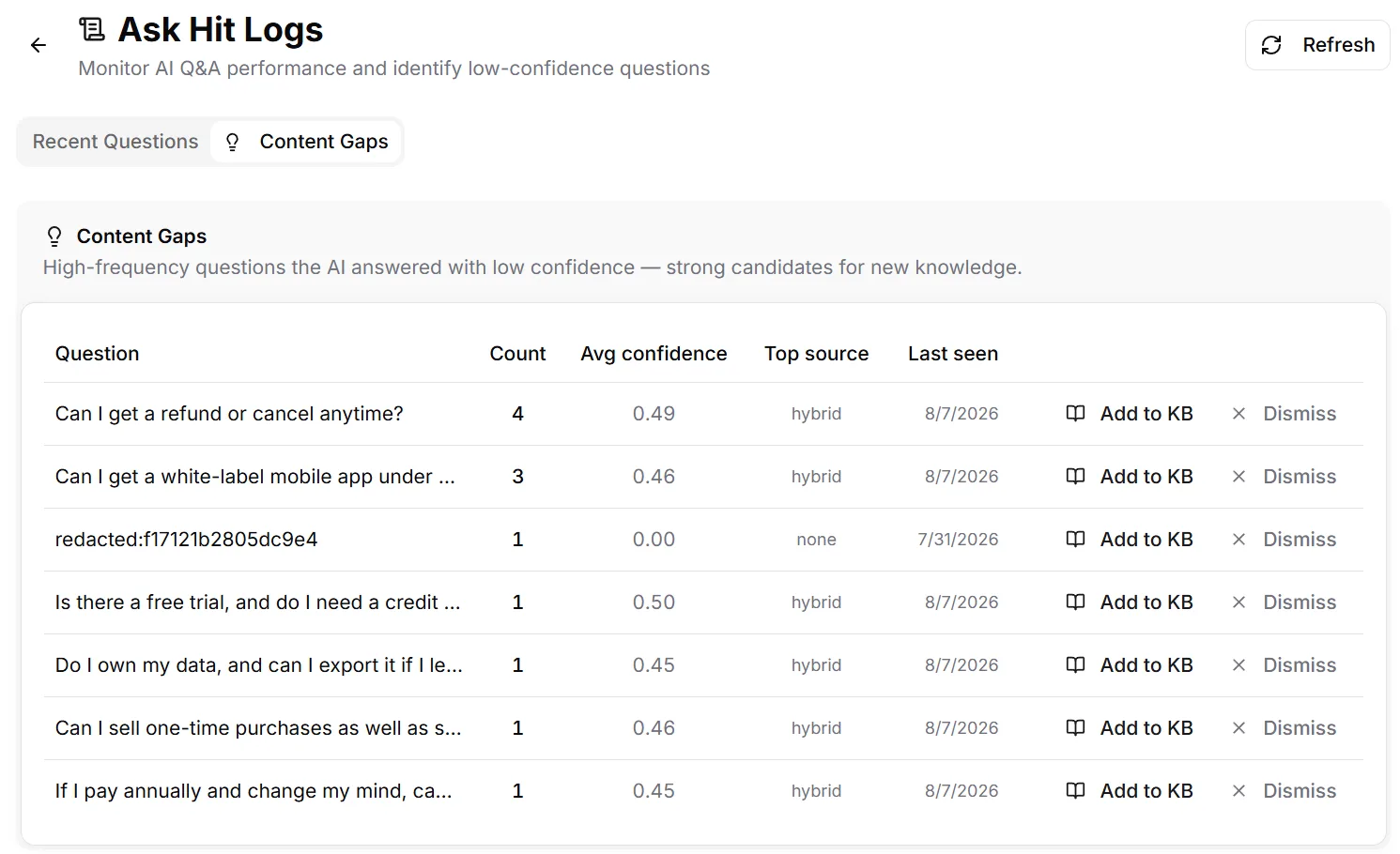
The questions it keeps fumbling, with one click to write the answer.
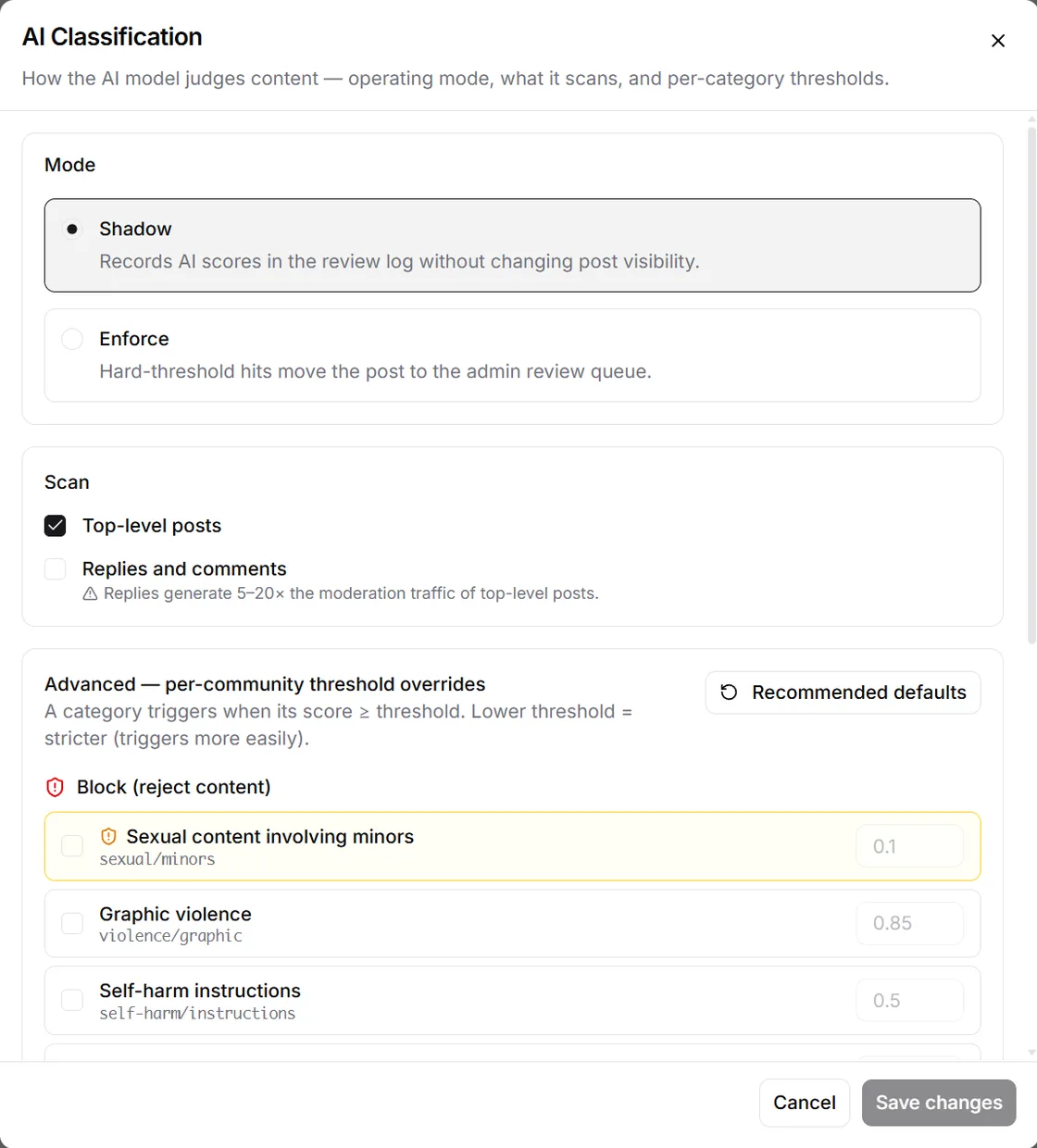
Run it in shadow first, read the scores, then enforce.
Capabilities
A full RAG stack, not a chatbot wrapper
Retrieval-augmented generation with source citations, per-member context, admin guardrails, and analytics — the whole AI layer, not a UI bolted on top of someone else's API.
Knowledge Base RAG
Upload PDFs, URLs, and internal documents to create a community-specific knowledge source that the AI can cite and reason over.
Community content indexing
Index posts, blogs, and discussions so the AI reflects what your community actually talks about instead of generic internet answers.
Member-facing chat
Give members a fast, integrated AI assistant inside the product instead of pushing them to a separate chatbot experience.
Admin controls
Set source priorities, response style, and content boundaries so the AI represents your community the way you intend.
Usage analytics
Track query volume, adoption, and answer quality to understand whether the AI is genuinely reducing friction.
Interaction logs
Review conversations, investigate edge cases, and use real member questions to improve your knowledge base over time.
Built-in vs Bolted-on
The differentiator is not just having AI. It is having AI intimately tied to your platform, your unique knowledge, and your controls.
| Dimension | Mateflow AI | Bolted-on / generic AI |
|---|---|---|
| AI availability | Built-in from day one — all plans | Add-on, paid seat, or higher tier only |
| Knowledge source | Your docs + indexed community content | Generic model output with no community context |
| Source citations | Inline citations linking back to the doc or post | No citations or vague references |
| Admin controls | Source priorities, response style, content boundaries | Minimal or none |
| Member context | Aware of member tier, joined spaces, recent activity | Same answer for every member |
| Analytics | Query volume, unanswered topics, satisfaction signals | Not tracked or surfaced |
| Interaction logs | Full conversation history for review and KB tuning | Logs locked behind enterprise plans |
| Pricing | Bundled in platform plans — no per-seat AI upcharge | Per-seat or per-query upcharge |
What communities actually use AI Copilot for
Real workflows where built-in AI replaces friction with instant, context-aware answers.
Community knowledge assistant
Members get instant answers from your accumulated knowledge without digging through old threads or waiting for a human reply.
Customer support acceleration
Deflect repetitive support questions and reserve the human team for the cases where judgment, escalation, or empathy matters more.
Onboarding for new members
Use the AI as the first guide for how the community works, where to start, and which resources matter most in the first week.
Content discovery
Help members discover relevant posts, events, resources, and recurring discussions through natural-language questions.
AI scales with your community
Every plan includes AI Copilot. Higher tiers unlock more queries, Knowledge Base sources, and community indexing.
AI Copilot — frequently asked questions
How Mateflow's AI Copilot is trained, cited, controlled, and priced.
Yes. Every answer includes inline citations that link back to the exact document or community post it drew from, so members can verify the source and admins can trust the output.
You train it on your own Knowledge Base — PDFs, URLs, and internal documents — plus indexed community content like posts, blogs, discussions, and events. It answers from your content, not generic model data.
AI Copilot is built into every Mateflow plan, not a separate add-on. Plans differ by how many monthly queries and Knowledge Base sources they include, with Enterprise negotiated to fit. The pricing page lists the current allowance for each plan.
Yes. Admins set source priorities, response style, and content boundaries so the AI represents your community the way you intend. Answers are also member-aware, adapting to a member's plan tier, joined spaces, and recent activity.
It is a full retrieval-augmented (RAG) stack tied to your knowledge and controls, not a UI wrapped around a generic API. Answers are grounded in your docs and indexed community content, cite their sources, and respect admin guardrails.
Keep learning
Related guides & resources
Give your community the AI it deserves
Start with a 14-day free trial. AI Copilot is included in the platform, not a separate add-on.