Reach every member —inbox, in-app, and on-site.
Compose a broadcast once and deliver it as email and in-app or push notifications, reuse saved templates, and run tier-targeted banner and popup campaigns — all from one admin surface.
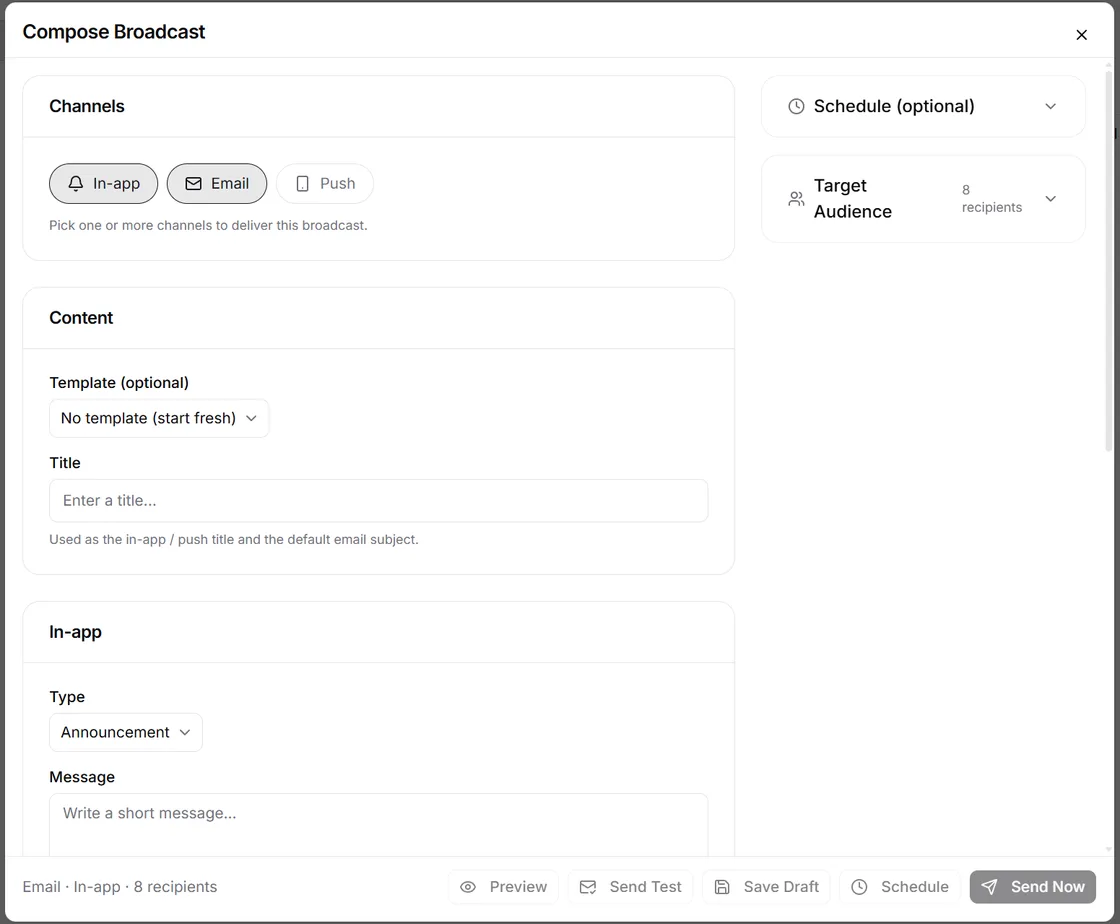
How it works
One composer, every channel
No separate 'email tool' and 'notification tool' — broadcasts and community-wide campaigns live in the same admin console as the rest of your community.
Compose once
Write your message in the unified broadcast composer — the same surface handles email and in-app or push notifications.
Deliver everywhere
Send across channels in one go, and pair the broadcast with a community-wide banner or popup campaign targeted at the tiers you choose.
Reuse and review
Save message templates for the next send, then browse sent and scheduled broadcasts and inspect each one in its detail view.
Capabilities
Broadcasts, banners, and popups — one surface
Everything an operator needs to reach members: a unified composer, history and templates, community-wide campaigns with tier targeting, and sender settings kept out of the way.
Unified broadcast composer
Compose one message and deliver it as email and in-app or push notifications from a single composer — the email channel is included from the Growth plan.
Broadcast list & history
Browse sent and scheduled broadcasts in one list and open any of them to inspect the details of that send.
Reusable templates
Save broadcast templates and reuse them, so recurring announcements don't start from a blank page.
Community-wide banner campaigns
Publish a sticky announcement banner across the whole community, with style options to match the message.
Popup campaigns
Run a community-wide modal popup for the announcements that shouldn't be missed — launches, deadlines, big changes.
Tier-targeted audiences
Scope banner and popup campaigns to specific membership tiers, using the audience structure your community already runs on.
Custom sender identity
Send email from your own sender name and address with reply-to control — available on the Enterprise plan.
Bring your own SMTP
Route outgoing email through your own SMTP server for full control over delivery — available on the Enterprise plan.
Built-in communications vs a separate marketing stack
Bolting an email tool onto your community splits audiences, templates, and history across products — and adds another subscription.
| Dimension | Mateflow Communications | Separate email tool + community |
|---|---|---|
| Email broadcasts | Built into the admin console, from the Growth plan | Paid email add-on or separate product |
| In-app & push | Same composer as email — one send | A different tool with its own setup |
| On-site campaigns | Community-wide banner and popup, built in | Third-party widgets pasted into the page |
| Audience targeting | Scoped by your membership tiers | Lists synced by CSV export |
| Templates | Saved and reused in the same module | Rebuilt separately in every tool |
| Sender identity | Custom sender and your own SMTP on Enterprise | Vendor domain or extra configuration fees |
Why one outbound surface beats a marketing stack
When email, notifications, and on-site campaigns share one console, every announcement gets simpler — and nothing needs syncing.
Email and notifications, one composer
Most community tools split email and notifications into separate products. Here they share one composer, one list, and one template manager.
Banner and popup campaigns built in
Community-wide announcement campaigns ship as part of the platform — a sticky banner and a modal popup, not a paid add-on or embedded widget.
Campaigns scoped by membership tier
Banner and popup campaigns target the member tiers you already run, so the right audience sees the right message without exporting lists.
Settings out of the campaign flow
Sender identity and SMTP live in community settings, so day-to-day campaign work stays focused on the message — not the plumbing.
What operators send with Communications
From launch announcements to tier-specific campaigns, the same console covers the outbound work of running a community.
Launch announcements
Announce a launch, event, or policy change to everyone in one send — broadcast to inbox and in-app, with a banner on the community.
Tier-targeted campaigns
Run a popup campaign aimed at new members or a specific membership tier — promotion and onboarding without exporting a list.
Operational updates
Maintenance windows, schedule changes, community news — push a banner community-wide so no member misses it.
Email from your own name
Send broadcasts from your own sender name and address, and through your own SMTP — both on the Enterprise plan.
Communications — frequently asked questions
Answers on channels, plans, email volume, and targeting for member communications.
Yes. Compose a broadcast once in the unified composer and deliver it as email and in-app or push notifications in a single send — there's no separate email tool and notification tool.
In-app and push broadcasts plus banner and popup campaigns are included on every plan. The email channel starts on the Growth plan, and a custom sender identity is available on Enterprise.
Email volume scales with your plan: 5,000 emails per month on Growth, 25,000 on Business, and unlimited on Enterprise.
Yes. Community-wide banner and popup campaigns can be scoped to specific membership tiers, so the right audience sees the right message without exporting lists.
Both are available on the Enterprise plan: you can send from your own sender name and address with reply-to control, and bring your own SMTP for full control over delivery.
Reach every member from one place
Start with a 14-day free trial. Broadcasts, banners, and popups are built into every plan — email marketing from Growth up.